Why It Matters
The browser has become central to how work gets done, but security strategies have not kept pace. Employees now use the browser to access applications, handle sensitive information, collaborate, and interact with AI, making it a growing source of enterprise risk. Yet traditional approaches were not designed to secure activity in the browser itself, leaving organizations with critical gaps in visibility, control, and data protection.

Product Overview
Bringing zero trust to the browser
Zscaler Zero Trust Browser extends Zero Trust to the place where work now happens most: the browser. It enables organizations to take a more complete Zero Trust approach by securing user activity, data, application access, and AI interactions within the everyday flow of work, helping protect a rapidly expanding layer of enterprise risk.

Threat isolation and browser detection and response
Safeguard users from advanced web threats by combining AI-based isolation of web threats and Browser Detection and Response (BDR) capabilities to mitigate browser attacks.

Cloud and in-browser data protection
Cloud-delivered and in-browser data loss prevention, including screenshot and keystroke logger protection, secures sensitive information on any device or browser.

Device posture based access
Enforce real-time posture checks to allow app access only from compliant devices, with ongoing posture assessments.

Integrated with the Zero Trust Exchange
Seamlessly integrate with ZPA for secure app access, ZIA for robust web threat protection, and Zscaler inline data protection for consistent data security.

Secure file-based productivity
Keep productivity flowing without added risk—users can access instant, secure previews of files within the Zero Trust Browser as they’re analyzed in the sandbox.

FedRAMP authorized
Confidently meet compliance and mandates with our FedRAMP Moderate and High authorized solution.
The right form factor for every use case

01
Cloud Browser Isolation
Use cloud-based threat isolation to contain web threats away from the endpoint, and deliver secure app access from the cloud to keep data off managed or unmanaged devices when installs aren’t feasible

02
Browser Extension
Deploy quickly to add BDR, data controls, and posture-based app access to users’ existing browsers, with no migration required.

03
Enterprise Browser
Standardize on a dedicated Chromium browser with consistent security, access, and data protection for maximum control and governance.
Benefits
Built to secure how you work today and tomorrow

Stop threats other tools miss
Zero Trust Browser stops browser-based threats that traditional network security and EDR tools often can’t see. With industry-first Browser Detection and Response, it brings security deeper into the browser, where modern attacks increasingly occur.

Secure data at the last mile
Zero Trust Browser helps protect sensitive data at the last mile of work by enforcing control directly in the browser, reducing risk from actions like copy and paste, uploads and downloads, screenshots, and keylogging.

Flexible protection for every use case
With the ability to enforce browser security through an extension, enterprise browser, or cloud browser isolation, organizations can apply the right level of protection for different users, workflows, and business needs.

Consistent zero trust across browser and beyond
Natively integrated with the Zscaler Zero Trust Exchange, Zero Trust Browser helps organizations extend consistent Zero Trust across the browser and the broader enterprise through a single, unified platform, closing policy gaps, and reducing costs.
According to Gartner estimates, browser isolation can reduce attacks on end user systems by up to 70%.
Browser Detection and Response
Stop threats other tools miss
Detect and stop browser-based threats that traditional network security and EDR tools often miss with industry-first Browser Detection and Response.
Expose hidden browser risks instantly
Continuously monitor rich browser telemetry such as DOM changes, browser APIs, permissions, network requests, file activity, clipboard activity, and extension behavior.
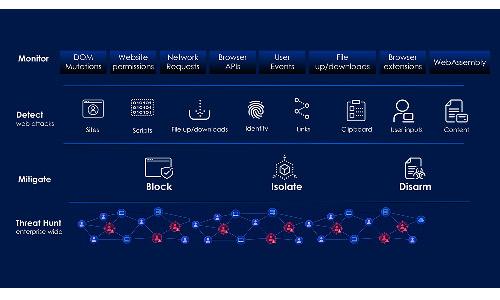
Block browser threats instantly
Detect and block in-browser threats across sites, files, extensions, identity, and clipboard activity before users are compromised or data is lost.
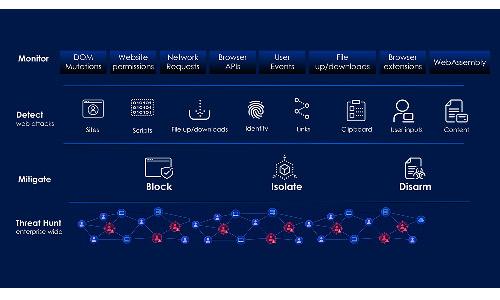
Map and visualize attack paths
Give security teams deep visibility into attack paths with attack graphs, attack correlation, DOM reconstruction, and session recording for faster root cause analysis.
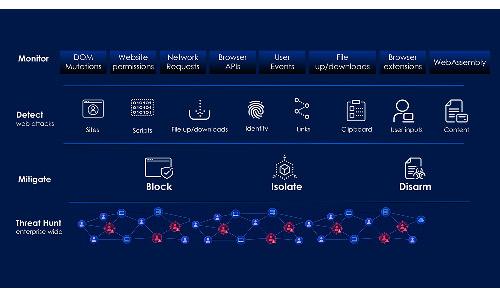
Accelerate response with threat insights
Speed response with malicious file acquisition, disposable file viewing, and AI-generated attack reports that summarize impact, affected users, and remediation steps.
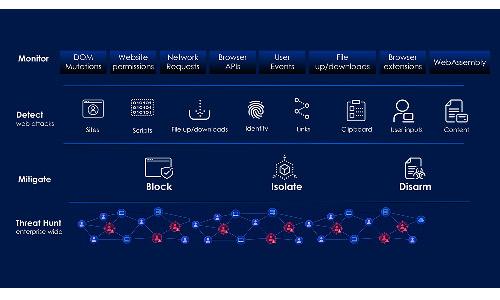
Last-Mile In-Browser Data Protection
Protect Data at the Last Mile
Protect sensitive data in the browser with controls for copy/paste, uploads, downloads, screenshots, and other high-risk user actions.
Stop risky copy and paste actions
Prevent sensitive data from being copied out of enterprise apps or pasted into unsanctioned destinations.

Inspect and secure all file transfers
Inspect and govern file movement to reduce risky uploads, unauthorized downloads, and data exfiltration.

Prevent screen capture of sensitive data
Limit screen capture of sensitive browser content to help prevent visual data loss.

Protect sensitive inputs
Help protect sensitive inputs from interception during browser-based sessions.

Identity-Aware Controls
Dynamic, identity-driven access for every workflow
Apply adaptive browser policy based on user identity, device trust, app sensitivity, and risk signals—not just destination or location.
Map browser controls to users
Map browser controls to user identity, role, and group membership.

Adapt controls to risks
Adapt controls based on device trust, location, application, and risk signals.

Enforce policy at the browser layer
Enforce actions like copy, paste, print, upload, and download at the session level.

Tailored protections for contractors & BYOD
Apply distinct protections for employees, privileged users, contractors, partners, and unmanaged-device users.

Device Trust and Posture
Safely extend access to unmanaged and BYOD endpoints
Adapt browser controls based on device ownership, health, and management state, including secure access for BYOD and unmanaged devices.
Differentiate managed vs unmanaged devices
Apply different browser controls based on whether a device is corporate-managed, BYOD, or otherwise unmanaged.

Continuously verify device health
Adjust protections based on device trust and health signals to align security with risk.

Secure access on unmanaged devices
Extend access to private apps and sensitive workflows without requiring full device management.

Adapt security to specific use cases
Match the right browser security approach, such as extension, enterprise browser, or isolation, to device trust and use case.

Use Cases
Superior cyberthreat and data protection

Protect users from web and browser-borne threats by isolating web threat content in the cloud while uniquely stopping browser-borne threats, ensuring seamless browsing experiences.

Prevent sensitive data exposure through AI prompts and block risky actions, such as improper upload/download or clipboard misuse, ensuring secure interaction with generative AI tools.

Strengthen your browser security by enabling real-time detection and response directly within the browser layer. Detect and block browser threats like malicious extensions, identity and OAuth attacks, or malicious scripts.

Extend secure application access to unmanaged, allowing contractors and partners using BYOD to safely engage with SaaS and private web apps while safeguarding data.

Simplify operations and reduce costs by replacing complex VDI setups with a secure alternative that ramps up security and brings down cost.

Ensure compliance and security by enforcing real-time device posture checks. Adapt access policies dynamically based on the health and security status of devices.

Enhance threat detection and response by SOC teams by allowing secure web investigations of suspicious sites.

Enable secure, policy-driven access for privileged users to sensitive apps without clients or VPNs. Strengthen security by applying granular controls at the browser level.
Customer Success Stories